UX DESIGN
SENIOR PRODUCT DESIGNER
6-WEEK PROJECT
B2B ENTERPRISE SAAS
Entity Maintenance: A tool built for clarity, and a design decision I had to let go
A deep dive into one tool from the larger self-service platform. This case study covers the specific design decisions that shaped Entity Maintenance, including one I was genuinely proud of that did not make it to production, and on that came from going further than the brief required.
6 weeks
From kickoff to handoff
Pattern library
Dashboard toggle contributed as a shared pattern
1 pivot
Design changed mid-build due to a component constraint
BACKGROUND
What Entity Maintenance is and who it is for
THE CONTEXT
Large enterprise clients on the platform often operated across dozens or hundres of locations, each with its own address, contacts, and financial accounts. Before this tool existed, that information lived in spreadsheets, email threads, or nowhere in particular. Entity Maintenance gave clients a central place to create and manage records for each location within their organization.
AN EXAMPLE
Think of a large department store chain with locations across the country. Each store has a physical address, a set of people to contact, and banking accounts used for things like rent and maintenance costs. Entity Maintenance let a client create a record for each of those locations, attach the right contacts, store the relevant banking details, and keep everything in one place making it accessible to the right people and editable when things change.
PROBLEM
Scattered information with no central place to manage it
Clients were managing location-specific information manually or not at all. There was no structured way to store a contact list for a specific location, no way to associate banking accounts with individual entities, and no way for internal teams or client administrators to look up that information reliably.
THE ADDED COMPLEXITY
Different users within the same organization might have access to certain entities. A regional manager should not necessarily see records for locations outside their region. That access control layer added complexity to what might otherwise have been a straightforward data management problem.
THE GOAL
Give clients a reliable, self-service way to create and maintain entity records without relying on internal teams to manage that information on their behalf
DESIGN DECISIONS
Three decisions that defined how the tool worked
DECISION 01
A single page over a stepper, and why that mattered
The create flow had three distinct sections of information: entity details, contacts, and banking accounts. Before getting to those sections though, users had a choice to make — how they wanted to create entities in the first place.
Clients managing a handful of locations might add them one by one using a manual form. Clients managing hundreds of locations needed a faster path. A simple radio button let users choose between uploading a CSV or Excel file and entering information manually. The file upload path included backend logic to catch duplicates, missing required fields, and other issues before anything was written to the system. If problems were found, the upload would skip those records and provide the user with a downloadable file listing everything that needed attention so they could fix it and try again rather than starting from scratch.
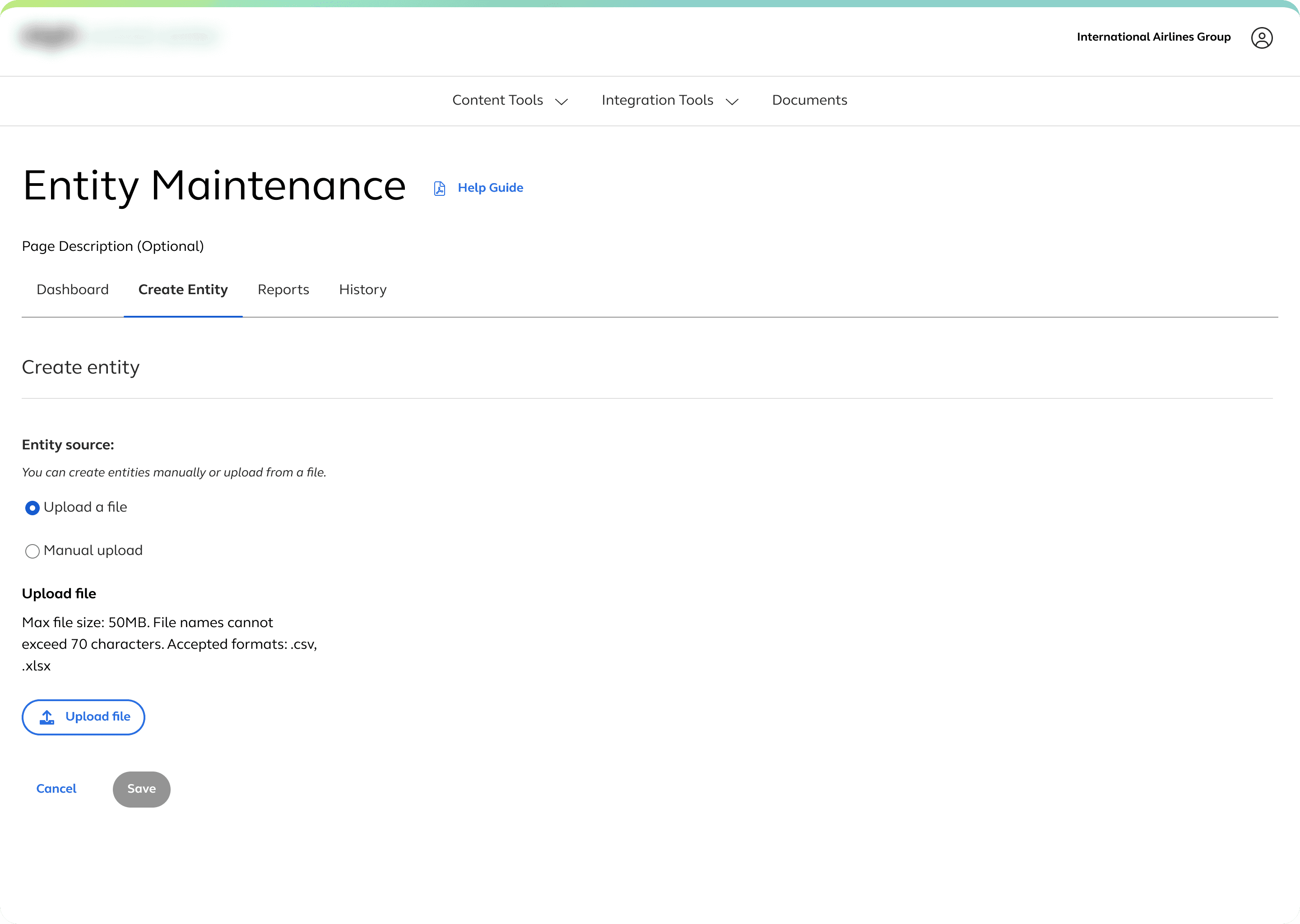
Uploading a file to create a record in the tool
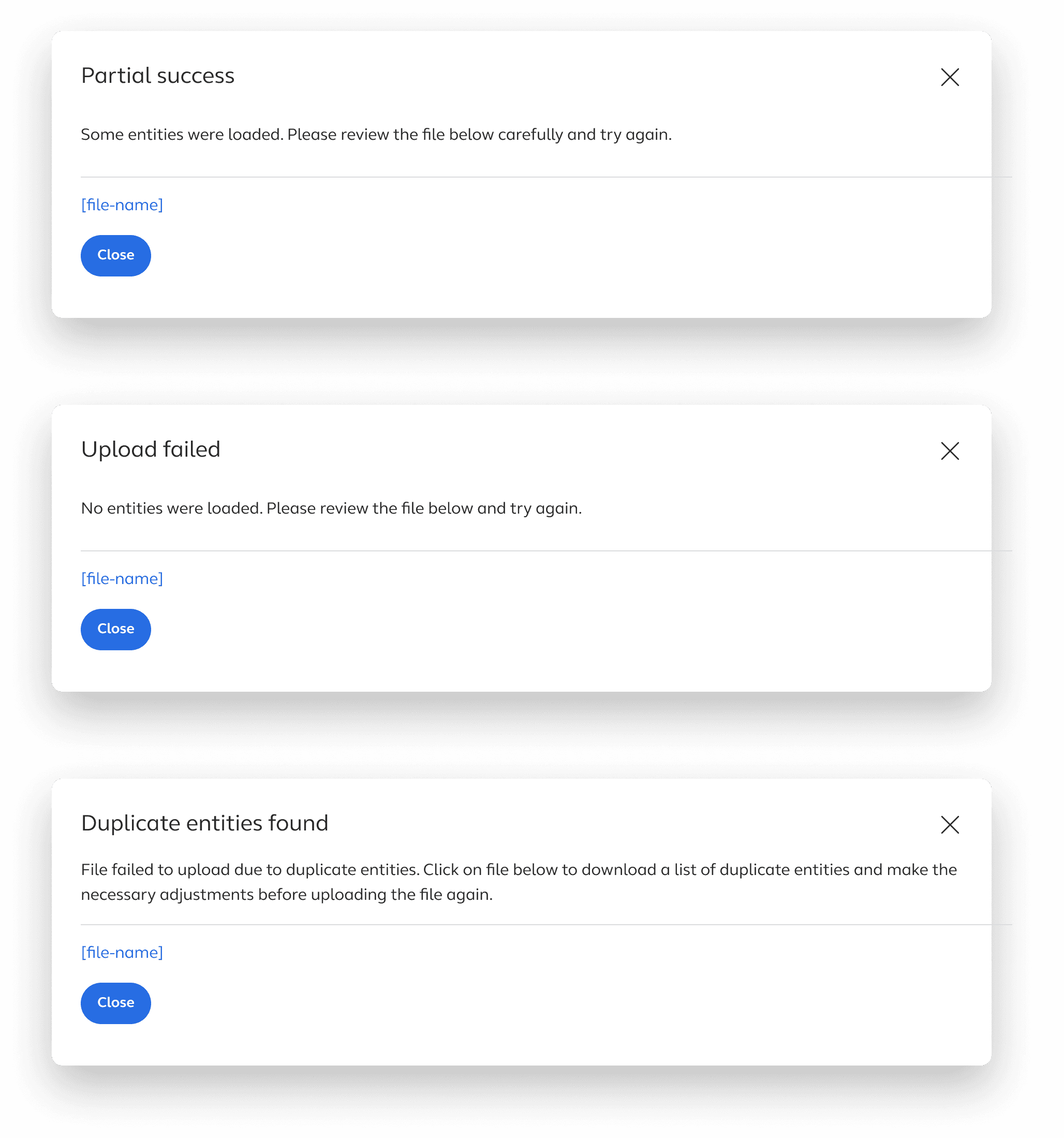
Upload error messages
The manual path had three distinct sections of information to fill in: entity details, contacts, and banking accounts. On the surface that sounds like a natural stepper — three steps, move through them in order, done. But we were told early on that users might need to move back and forth between sections while setting up an entity, referencing banking information while adding a contact, or checking entity details while filling in account information.
Forcing that into a linear stepper would have introduced unnecessary friction. Instead we used a single page with accordion sections. Each section could be opened and closed independently, letting users focus on one area at a time without losing access to the others. It kept the flow manageable without making it rigid.
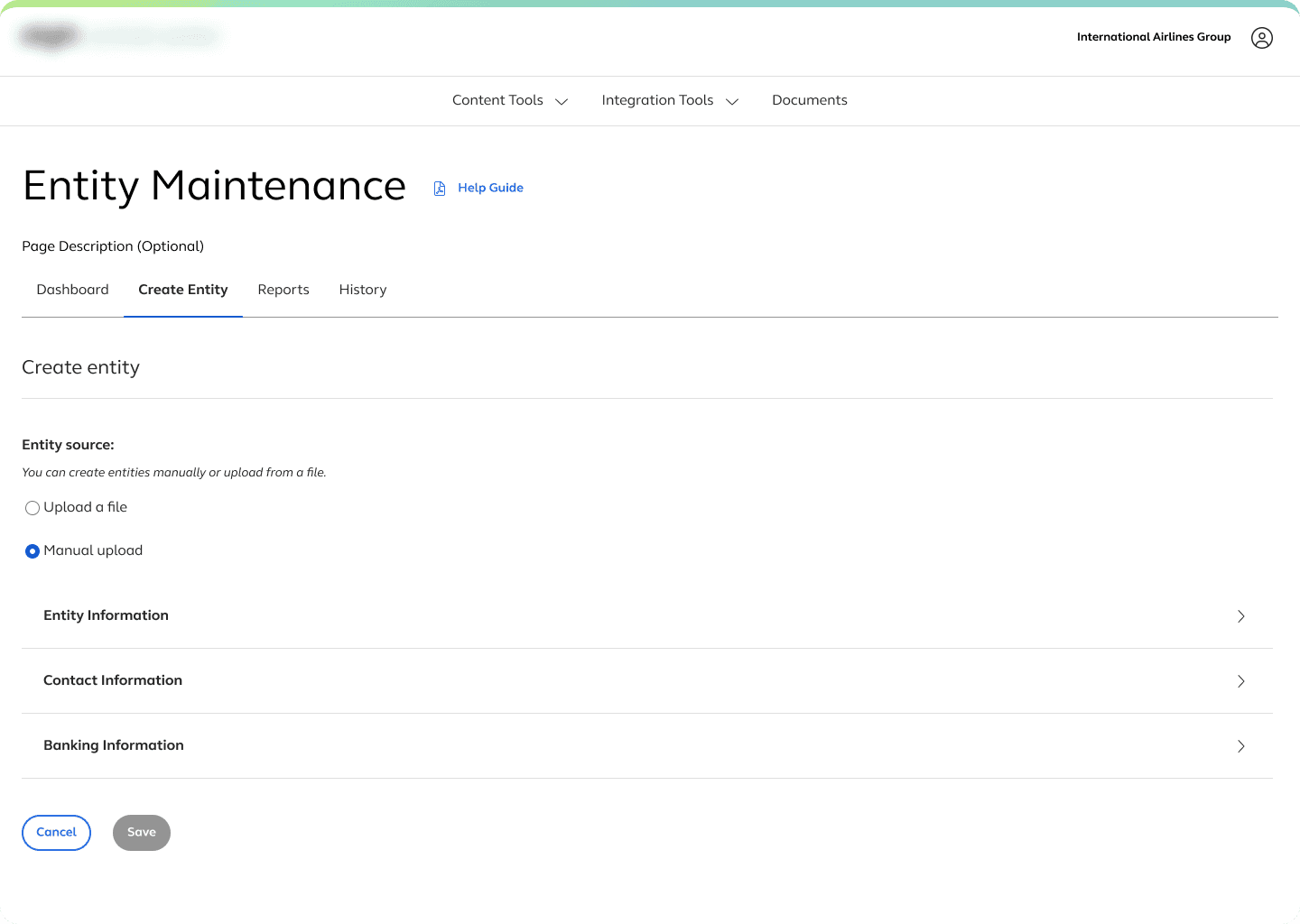
Manual upload with accordion drawers closed
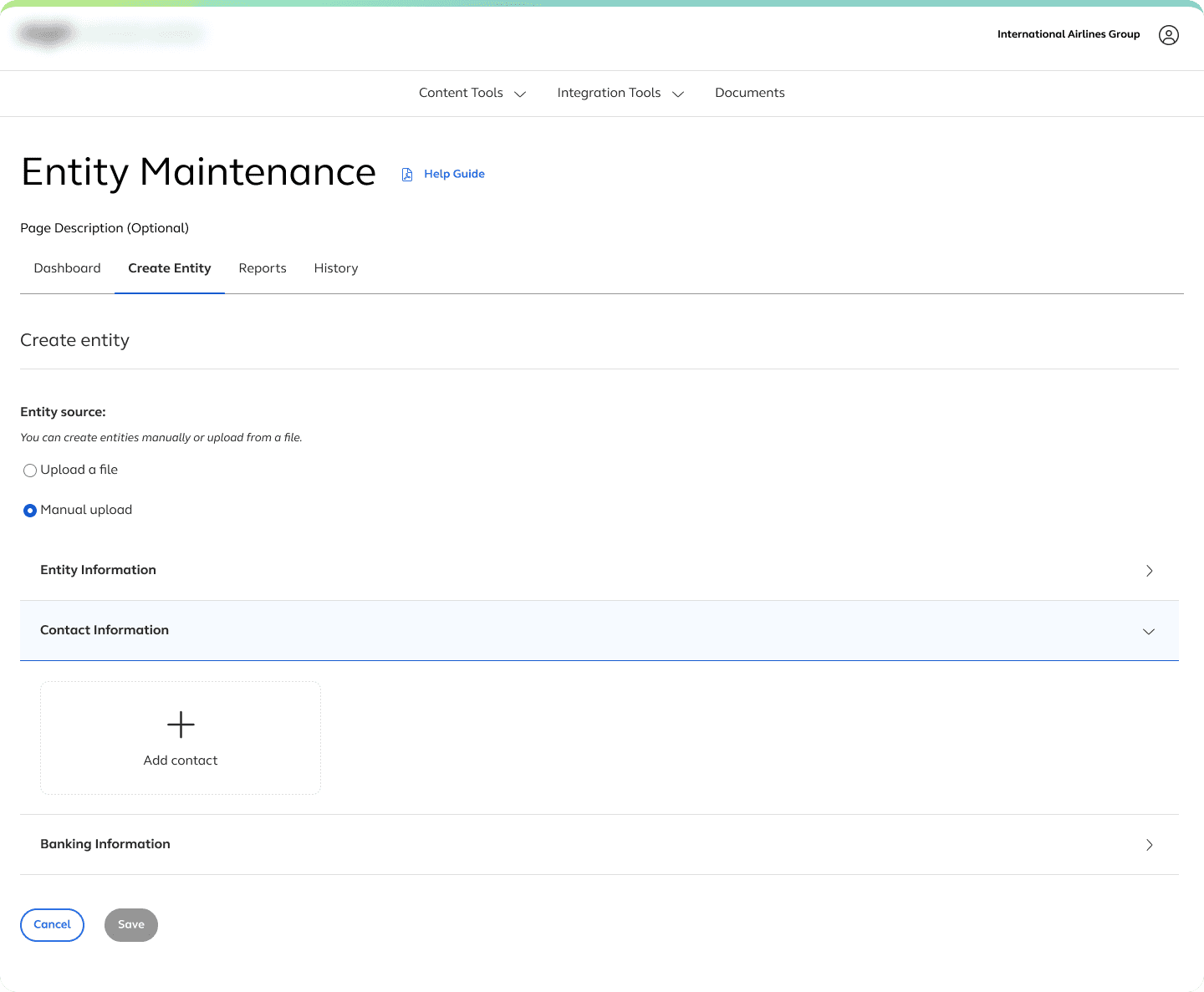
Contact information accordion open
DECISION 02
The rolodex — a design I liked, a constraint I did not see coming, and what happened next
When I started thinking about how to display contacts on the entity details page, I kept coming back to something specific. Growing up, my mom had a rolodex in an old roll top desk that I used to play with. It was the kind with tabs for each person's name that you could flip through to find what you were looking for, then pull out the card to see the rest of the details. I thought there was something worth borrowing in that mental model. Each contact as its own card. Just enough information visible at a glance. The PM confirmed that the typical lookup usually involved the contact's name and email, so we decided on that and a way to open it to see the rest.
I knew going in that anything animated was off the table. This was an HR administration platform, not a consumer product, and a literal rolodex animation would have been the wrong call. But the card structure itself felt right. Primary contacts would be visually distinct from secondary ones. The grid would give users a quick scan of everyone associated with an entity. And it would bring a small amount of visual character to a platform that tended to prioritize function over form, which the PM noted specifically when I presented it. The design was well received. Nobody flagged any concerns. We moved into handoff.
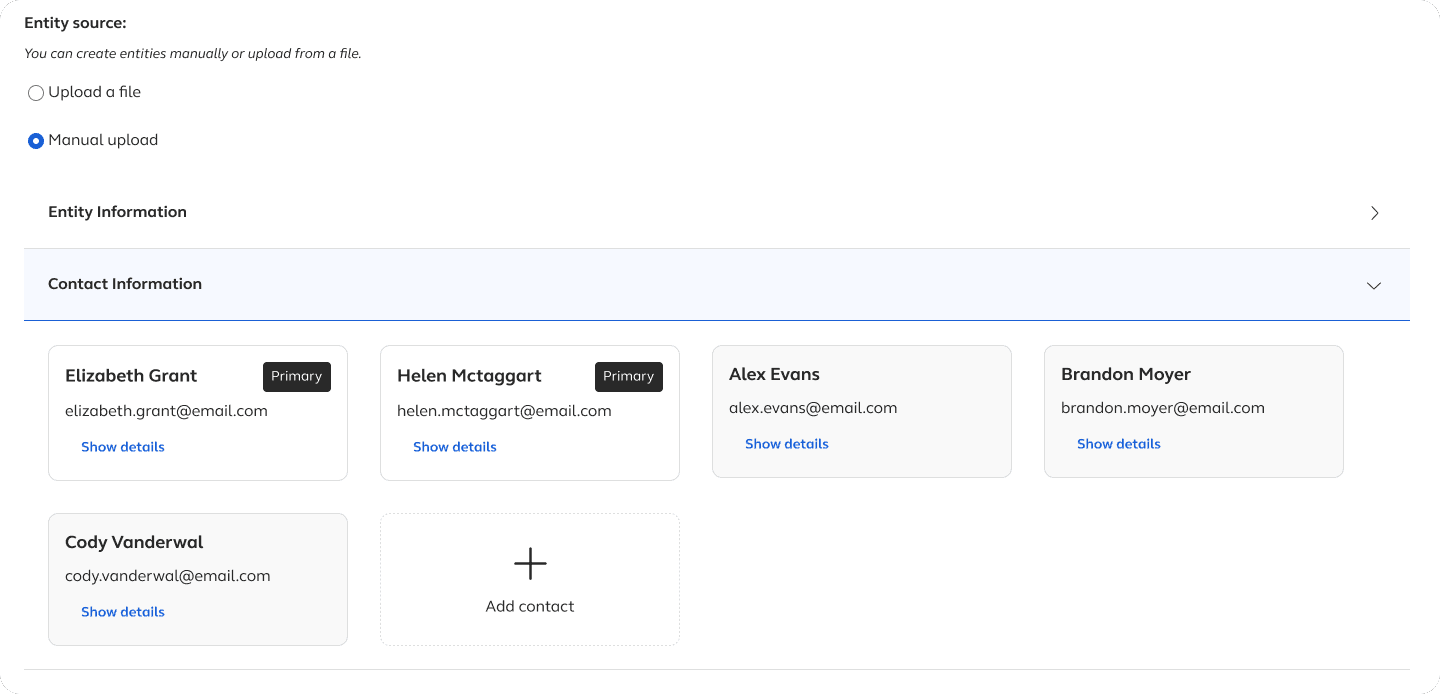
Original card design
Mid-build, the developers ran into a problem. The card component was setup to hug its content, meaning card height was determined by whatever was inside it. there was no way to make all cards in a row match each other's height without either adding new helper classes or building a new component entirely. Both options would have extended the timeline significantly and required a process that went well beyond the scope of this project. Without a fix, cards would appear at different heights depending on how much content they contained. Sitting next to each other in a grid that looked uneven and unpolished.
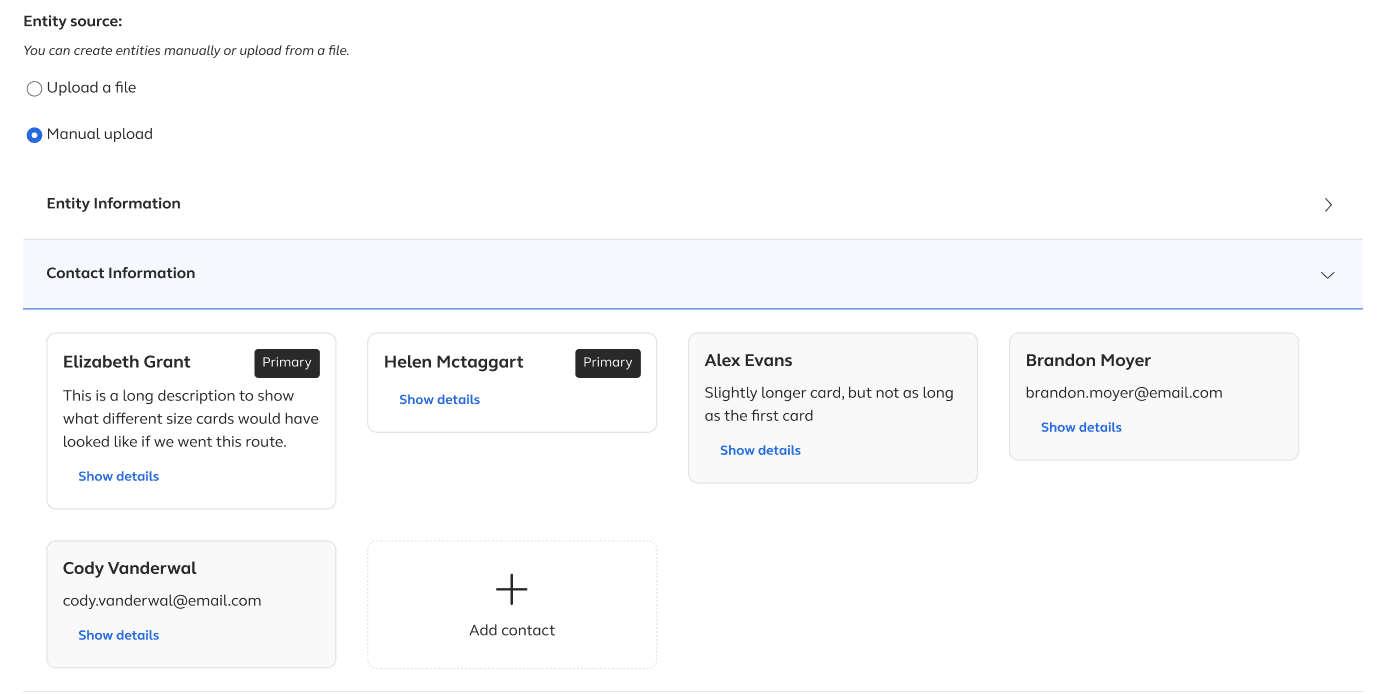
Cards with mismatched heights to show development issues
We made the call to change the design. Contacts moved into a data table showing first name, last name, email, primary status, and a link to view full details. It was the same structure as the contact view on the main dashboard, which meant it was already a proven pattern and required no new component work. Banking accounts followed the same change to keep the two sections consistent, even though the banking cards had not had the same problem.
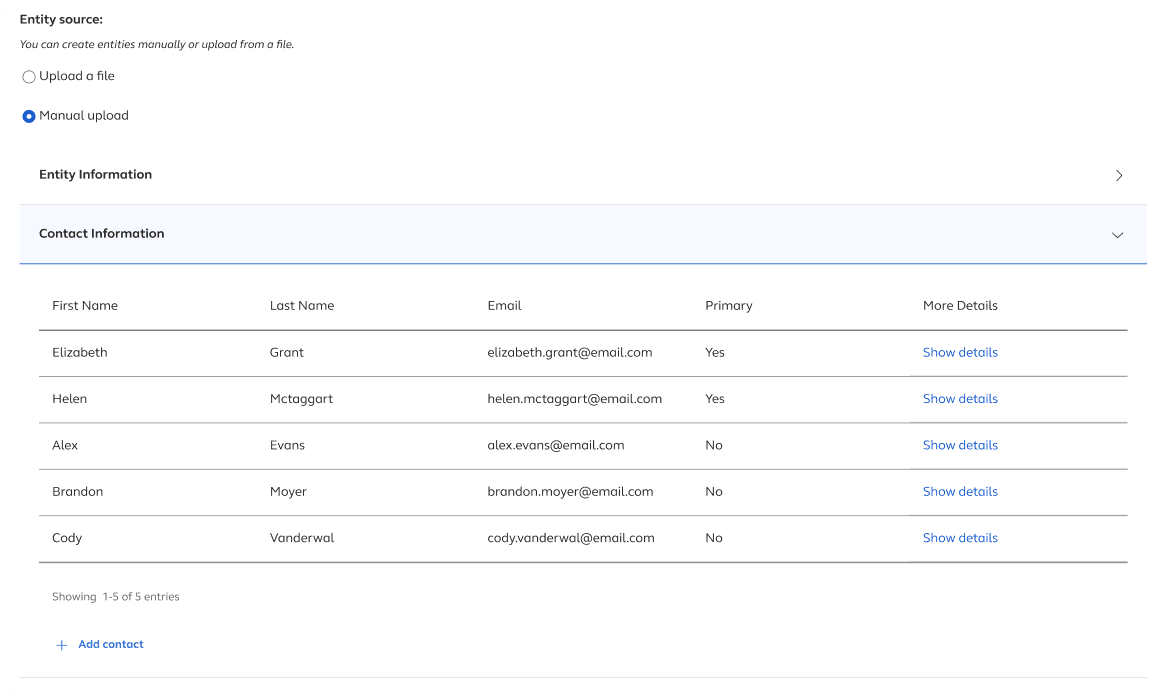
updated design using the data table view
DECISION 03
A dashboard feature that was not in the brief
The dashboard was initially scoped to show a table of entities. Straightforward, functional, nothing unexpected. While I was working on it I started thinking about a specific user scenario the requirements had not accounted for.
What if someone needed to find an entity but did not know what it was called? They might know a contact associated with, a name or an email address, but not the entity name itself. In a table of entities, that person has no way in. They would have to open records one by one until they found the right one.
I proposed adding a toggle to the dashboard that would let users switch the table between an entity view and a contact view. In the contact view, they could search by name or email and then navigate directly to the associated entity. Before committing to the design I brought it to the PM and the developers to validate the idea and confirm it would not introduce any meaningful performance or complexity issues. It did not, so we moved forward.
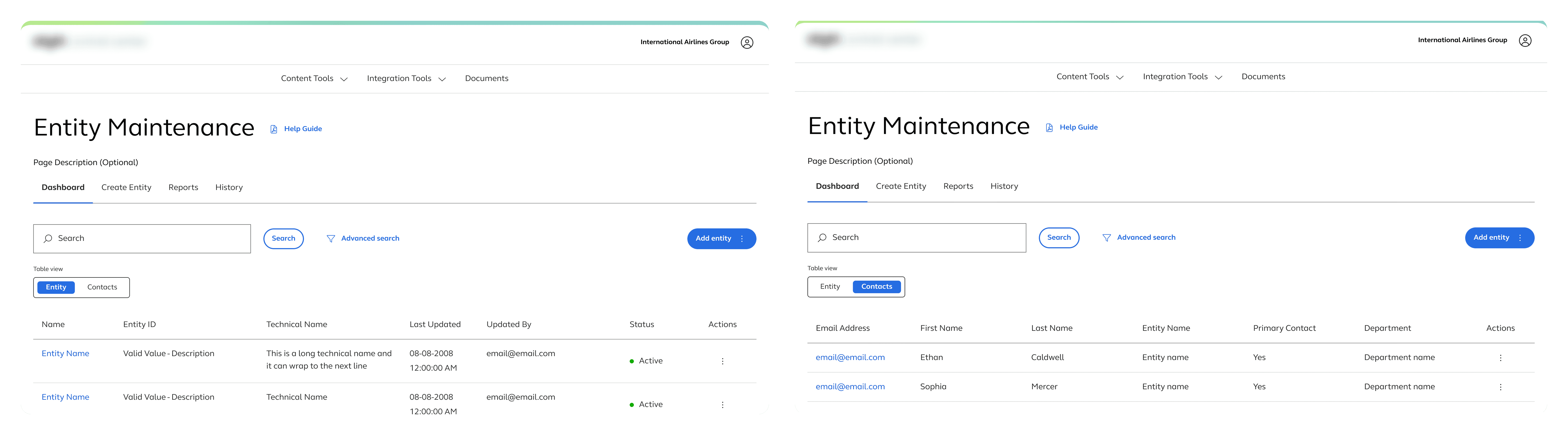
Tools featured a shared table structure, advanced search, horizontal tabs, and primary actions in consistent locations
The toggle pattern ended up in the platform's shared pattern library as a documented approach for dashboards that needed to surface multiple views of the same underlying data.
OUTCOMES
What shipped and what if left behind
Live
Tool is active in the platform
Entity Maintenance shipped and is currently live, used by enterprise clients to manage location-specific records across their organizations.
Pattern Library
Dashboard toggle contributed as a shared pattern
The approach of using a toggle to switch between data views on a dashboard was documented and added to the platform's shared pattern library for use across future tools.
Consistent
Constraint pivot led to a more scalable solution
The table design that replaced the contact cards was already a proven pattern on the platform. The pivot removed the component dependency risk and produced something easier to maintain and extend as client data grows.
KEY TAKEAWAYS
What this project refinforced
ON CONSTRAINTS
Late discoveries are a process problem, not a design failure
The card height issue could not have been caught in a design review. It only surfaced when the component was being assembled in code. What mattered was being willing to pivot quickly and honestly, without spending energy defending a direction that was no longer viable. The goal was never the cards. The goal was a clear, usable contacts section. The table got there.
ON GOING FURTHER
The brief tells you what to build, not what to notice
The dashboard toggle was not in the requirements. It came from thinking about how a real person might actually use this tool. Not just the happy path, but the moment when someone knows a contact's name but not the entity it belongs to. Paying attention to those gaps, and doing something about them even when nobody asked, is where some of the most useful design work happens.
ON THE WORK ITSELF
Caring about the details changes the quality of your thinking
The rolodex was not a gimmick. It was a way of thinking about how people organize information about other people, something tactile and personal turned into a structure for a data-heavy interface. It did not make it to production but it shaped how I thought about the problem in a way a generic card approach would not have. The personal connection to a design decision is not decoration, it is what keeps the thinking from being shallow.
OTHER PROJECTS