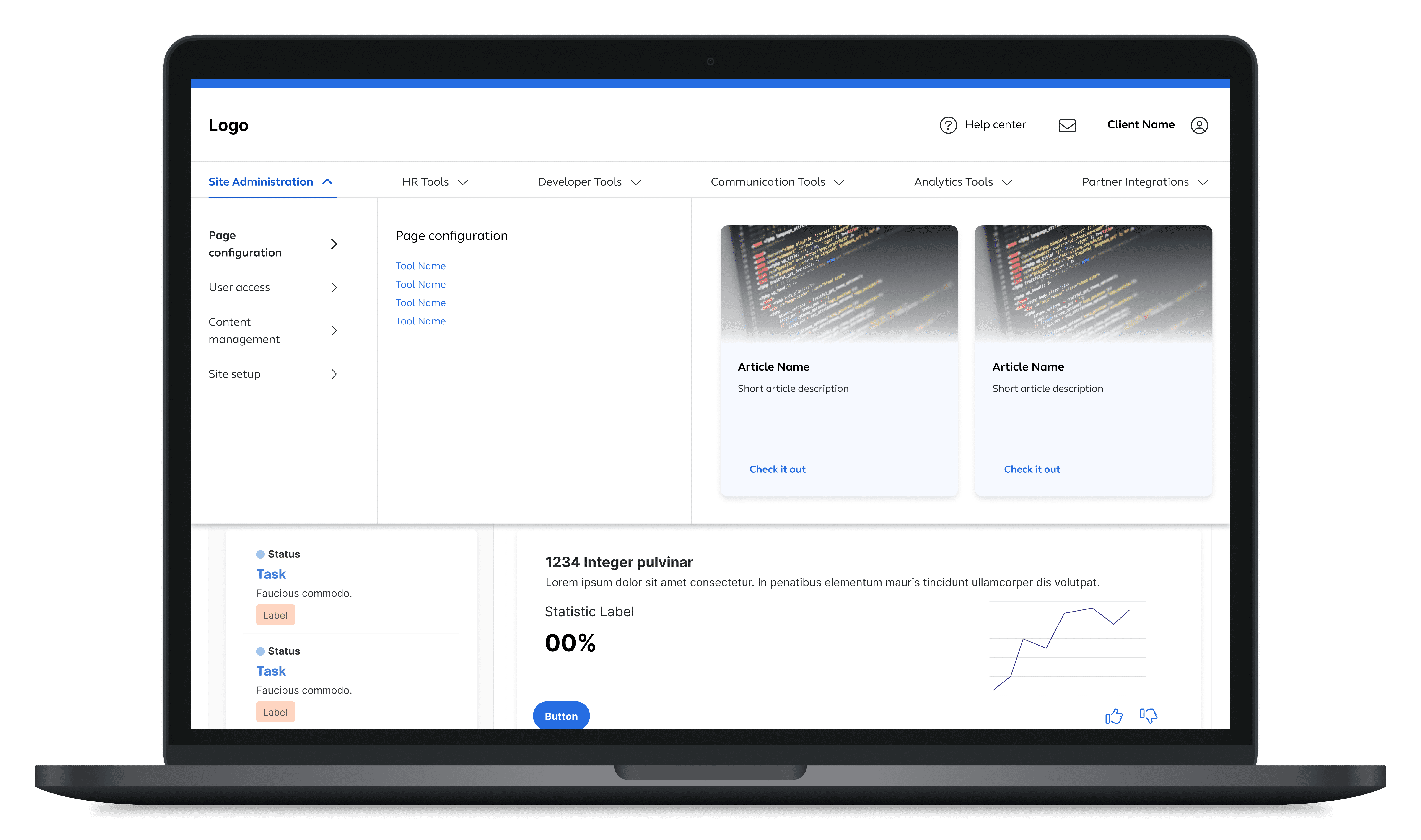
In Progress
Content and visuals are actively being refined as the project evolves. Some sections may change as additional exploration and validation are completed.
Internal and client-facing administrative platform supporting dozens of tools with varying access levels.
Role
Senior Product Designer
Timeline
Multi-month initiative
Platform
Client Self-Service Administration Platform
Summary
As the platform expanded from a handful of tools to dozens, the original navigation structure no longer scaled. This project focused on redefining the information architecture and navigation patterns to make tools easier to find, understand, and grow over time, while supporting both new and experienced users across internal and client-facing contexts.
Problem
Navigation labels no longer reflected the growing set of tools
The platform’s navigation was originally designed when only a few tools existed. As the number of tools grew to 35-40, the initial labels and groupings became less meaningful, making it harder for users to understand where tools lived or what they did. What once felt intuitive began to feel arbitrary as new capabilities were added.
New users struggled to locate tools without prior knowledge
Experienced users had developed a mental map of the platform over time, but new or infrequent users often struggled to find the tools they needed. Limited access to direct user feedback and ambiguous tool descriptions made it difficult to rely on existing assumptions, increasing the risk that navigation issues would worsen as the platform continued to scale.
Goals
Create a navigation structure that scales with the platform
The goal was to define an information architecture that made tools easier to find and understand while remaining flexible enough to support continued growth. Navigation needed to work for both internal and client administrators without relying on internal jargon or prior system knowledge.
01
Improve tool discoverability
Enable users to quickly locate the tools available to them through a persistent, clearly structure navigation system.
02
Support both new and experienced users
Design labels and groups that felt intuitive to first-time users while remaining familiar and efficient for existing users.
03
Create scalable, future-proof categories
Establish labels and groupings that were specific enough to be meaningful but broad enough to accommodate new tools over time.
04
Enhance clarity without overhauling familiar patterns
Evolve the navigation structure and drawer layout without introducing unnecessary novelty or disrupting established usage patterns.
Approach
Designing navigation that grows with the system
I approached the navigation as a living system rather than a static structure. The focus was on understanding how users mentally grouped tools, identifying patterns that could scale, and validating proposed changes through research and iterative testing rather than relying solely on internal assumptions.
My role in shaping the information architecture
I was the primary designer responsible for researching, defining, and validating the new navigation structure. I worked closely with a product manager who acted as a subject-matter expert, conducted all IA research independently and collaborated with other designers through critique and review sessions. While final decisions were made in partnership with product, I had significant ownership over the proposed solutions.
Design for predictability and clarity
Navigation needed to feel intuitive and predictable for both new and existing users. Labels were chosen to clearly communicate what users could expect to find while avoiding internal terminology that would only make sense to expert users.
Balance specificity with flexibility
Categories were defined to be specific enough to guide users effectively, while remaining flexible enough to support the addition of future tools without forcing a structural overhaul.
Validate structure through research, not assumptions
Card sorting and navigation testing were used to surface differences between new and experienced users. These insights informed naming conventions, category structure, and the final navigation design, helping align the IA with real user mental models.
Outcomes
A clearer, more scalable navigation model
The project resulted in a refined information architecture and navigation design that better reflected the growing set of tools. The proposed structure improved clarity, reduced ambiguity in labeling, and established a foundation that could support continued platform expansion
Validated direction, with room for future iteration
Moderated usability testing showed improved tool discoverability and clearer navigation paths. While the project was ultimately put on hold, the work produced a solid first iteration that could benefit from additional validation and refinement over time.
Key Takeaways
01
Naming is one of the hardest parts of IA at scale
Even small naming decisions can have a large impact on usability, especially when organizing complex systems with many tools and overlapping concepts
02
Early research reduces long-term risk
Relying on secondhand feedback instead of testing the existing structure limited early insights. In future projects, I would prioritize validating the “before” state to better understand baseline pain points.
03
Different users group information differently
Comparing new and experienced users highlighted meaningful differences in how tools were categorized reinforcing the importance of testing IA with multiple user perspectives.
04
Research is critical for expert-driven systems
When designing for niche or expert workflows, research becomes even more important to avoid unintentionally reinforcing assumptions that don’t hold up for broader audiences.